
Best Down Imaging Fish Finders: 5 Picks Compared by Sonar and Screen
Five down imaging fish finders from Garmin, Humminbird, and Lowrance, compared on ClearVü, Down Imaging, and DownScan views, transducers, and screens.
 Updated October 28, 2026

The best down imaging fish finder draws brush, rock, and fish under the boat as a clear picture, and that picture starts with the transducer in the box. Our pick is the Humminbird PiranhaMAX 4 DI, for anglers who want simple down imaging. The listing names a 4.3 in screen and the XNT 9 DI T transducer in the box; Humminbird lists that transducer with 455 and 800 kHz Down Imaging beams and describes the unit’s Down Imaging as non-CHIRP, paired with Dual Beam Plus sonar. Humminbird says it is one of two PiranhaMAX models still sold. Its listing names no GPS or maps, so if you want GPS or CHIRP ClearVü, the Garmin Striker Vivid 7cv adds GPS and pairs CHIRP ClearVü with a 7 in, 800 x 480 pixel display, per Garmin.
We compared five units. Each maker has its own name for the view: ClearVü on Garmin, Down Imaging on Humminbird, DownScan Imaging on Lowrance. What separates them is the transducer, whether live sonar or preloaded maps come along, and how much screen you get for the picture. None of the five lists side imaging with its included transducer, so if you are still weighing whether side imaging comes along on your next unit, start with our comparison of the two views.
This guide is general product information, not repair or electrical safety advice. Follow the installation, wiring, and charging instructions in your product’s manual, stop using any battery, charger, or electronics that overheat, swell, or smell of burning, and contact the manufacturer.
Our Top Picks at a Glance
- Best Overall: Humminbird PiranhaMAX 4 DI. Simple down imaging: non-CHIRP Down Imaging and Dual Beam Plus sonar, per Humminbird, on a 4.3 in screen with the XNT 9 DI T transducer in the box, per the listing, from a model Humminbird still sells. The screen is the smallest here, and the listing names no GPS or maps.
- Largest ClearVü Screen, Adds Wi-Fi: Garmin Striker Vivid 7cv. ClearVü on a 7.0 in, 800 x 480 pixel screen against 5.0 in on the Vivid 5cv, plus Wi-Fi, which Garmin does not list for the 5cv.
- Same ClearVü in a 5 in Unit: Garmin Striker Vivid 5cv. The same GT20-TM transducer and pixel count as the 7cv, on a 5.0 in screen that weighs 1.0 lb against 1.7 lb, per Garmin.
- Largest Screen, Adds Live Sonar: Lowrance Eagle Eye 9 Live. A 9 in display versus 7 in on the next-largest unit here, and the only one with Live Forward and Live Down views, per the listing.
- Preloaded Maps on a 5 in Screen: Lowrance HOOK Reveal 5 SplitShot. The only unit here with preloaded charts on a screen this size (almost 4,000 U.S. inland lakes, per the listing).
Down Imaging Fish Finders Compared
G = Garmin U.S. page, H = Humminbird help center, L = Amazon listing. Scroll sideways on a phone to see every column.
| Model | Down imaging | Screen | Other sonar | GPS and maps | Transducer in the box |
|---|---|---|---|---|---|
| Humminbird PiranhaMAX 4 DI | Down Imaging, non-CHIRP (H) | 4.3 in color (L) | Dual Beam Plus, 200 and 455 kHz (H) | None named (L) | XNT 9 DI T, Down Imaging at 455 and 800 kHz (H) |
| Garmin Striker Vivid 7cv | ClearVü (G) | 7.0 in, 800 x 480 pixels (G) | Traditional CHIRP (G) | GPS, Quickdraw 1 ft contours; no preloaded charts listed (G) | GT20-TM, ClearVü at 455 and 800 kHz (G) |
| Garmin Striker Vivid 5cv | ClearVü (G) | 5.0 in, 800 x 480 pixels (G) | Traditional CHIRP (G) | GPS, Quickdraw 1 ft contours; no preloaded charts listed (G) | GT20-TM, ClearVü at 455 and 800 kHz (G) |
| Lowrance Eagle Eye 9 Live | DownScan Imaging, Live Down (L) | 9 in IPS (L) | CHIRP, Live Forward, FishReveal (L) | C-MAP, more than 17,000 U.S. lakes; Genesis Live (L) | Live transducer pack (L) |
| Lowrance HOOK Reveal 5 SplitShot | DownScan Imaging (L) | 5 in SolarMAX (L) | Wide-angle high CHIRP, FishReveal (L) | C-MAP, almost 4,000 U.S. inland lakes; Genesis Live custom contours (L) | SplitShot (L) |
How We Chose
We kept only fish finders sold new on Amazon in the U.S. whose listing or maker page names a down imaging view, with its transducer in the box. We read each listing and the maker’s page where it opened: Garmin’s U.S. pages for both Striker Vivid units, and for the PiranhaMAX 4 DI, Humminbird’s help center, which lists it as one of two PiranhaMAX models still sold. Lowrance’s site blocked our requests, so its specs come from the listings. For units without down imaging, see our roundup of the best fish finders.
Best Overall needs a strong owner rating with enough ratings behind it, a model its maker says is still sold, and a full down imaging setup in the box. The PiranhaMAX 4 DI leads the units that clear that bar under our published criteria, so it takes the spot. It wins as a simple down imaging setup, not on features: it has the smallest screen here, non-CHIRP Down Imaging, and no GPS or maps named in its listing. The two Vivid units tie on sonar, since both ship with the GT20-TM; the 7cv follows for its larger screen, then the 5cv. The two Lowrance units, which we could check only against their listings, come last, from largest screen to smallest, since a down imaging picture needs room. The AnglerTechLab Score is one factor alongside maker confirmation and screen size; none of the five scores here carries an editorial adjustment. Scores start from Amazon owner ratings, with a limited editorial adjustment explained on our How We Review page; we work from listings, maker pages, and owner reviews rather than using the products ourselves. More sonar coverage is in our fish finders section.
We earn a commission from qualifying purchases made through links on this page. Commissions never affect our rankings or AnglerTechLab Scores.
The order of these products is explained in the article. The AnglerTechLab Score starts from Amazon customer ratings, with a limited editorial adjustment explained on our How We Review page.
| Award | Product | AnglerTechLab Score About AnglerTechLab ScoreThe AnglerTechLab Score is calculated with the published method on our How We Review page. Learn more › | |
|---|---|---|---|
 Humminbird PiranhaMAX 4 DI |
8.8/10 | Buy | |
 Garmin Striker Vivid 7cv with GT20-TM Transducer |
8.6/10 | Buy | |
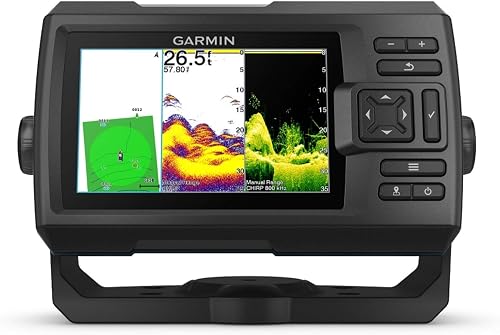 Garmin Striker Vivid 5cv with GT20-TM Transducer |
8.6/10 | Buy | |
 Lowrance Eagle Eye 9 Live with C-MAP Charts |
8.8/10 | Buy | |
 Lowrance HOOK Reveal 5 SplitShot |
8.1/10 | Buy |
Humminbird PiranhaMAX 4 DI
A 4.3 in color fish finder with Down Imaging and dual-beam sonar, according to the listing. It includes Fish ID+, fish and depth alarms, zoom, a tilt and swivel mount, and an XNT 9 DI T transom-mount transducer. The listing names no GPS or mapping.
Pros
- Down Imaging and dual-beam sonar, per the listing
- Fish ID+ with fish and depth alarms, per the listing
- Transom-mount transducer and tilt and swivel mount in the box
- Owners describe the menus and settings as easy to navigate
Cons
- No GPS or mapping named in the listing
- Down Imaging is non-CHIRP, per Humminbird
- One owner has had little success with the down view so far
Garmin Striker Vivid 7cv with GT20-TM Transducer
A 7 in GPS fishfinder with CHIRP traditional and ClearVü scanning sonar. Garmin lists 800 x 480 pixels, Quickdraw Contours mapping with 1 ft contours, and Wi-Fi for the ActiveCaptain app; the included GT20-TM transducer runs both sonars. Garmin lists no preloaded charts.
Pros
- 7 in screen at 800 x 480 pixels, per Garmin
- GT20-TM transducer runs traditional and ClearVü sonar
- Quickdraw Contours records your own 1 ft contour maps
- Wi-Fi for waypoint transfer and Quickdraw Community data, per Garmin
Cons
- No preloaded charts listed
- Garmin lists no SideVü for this model
- Needs a 12 to 20 V DC supply, per Garmin
Garmin Striker Vivid 5cv with GT20-TM Transducer
A 5 in GPS fish finder with traditional CHIRP and CHIRP ClearVü scanning sonar, sold with the GT20-TM transducer. Garmin lists an 800 x 480 pixel display, 500 W (RMS) transmit power, and Quickdraw Contours for building your own 1 ft contour maps. Garmin lists no preloaded charts.
Pros
- 800 x 480 pixel 5 in display, per Garmin
- Included GT20-TM transducer runs traditional CHIRP and ClearVü
- Quickdraw Contours records your own 1 ft contour maps
- 5,000 waypoints and 100 routes on Garmin's spec page
Cons
- No preloaded charts, per Garmin
- No SideVü or Wi-Fi listed for this model
- Needs a 12 V source; the series manual says it will not turn on below 12 V DC
Lowrance Eagle Eye 9 Live with C-MAP Charts
A 9 in IPS fish finder with live sonar, according to the listing. One included transducer provides Live Forward, Live Down, CHIRP, and DownScan with FishReveal, and plugs into the display without a separate sonar module. C-MAP charts cover 17,000+ U.S. lakes.
Pros
- Live Forward and Live Down views, per the listing
- 9 in IPS display
- No separate sonar module to install
- Two-year warranty, per the listing
Cons
- Live sonar adds aiming and mounting decisions
- One owner wrote that the C-MAP charts "aren't the best or accurate"
- Specs not confirmed on the maker's site
Lowrance HOOK Reveal 5 SplitShot
A 5 in fish finder with a SplitShot transducer that combines wide-angle high CHIRP and DownScan Imaging, according to the listing. It adds FishReveal, autotuning sonar, preloaded C-MAP maps for almost 4,000 U.S. inland lakes, and Genesis Live half-foot contour mapping.
Pros
- CHIRP and DownScan with FishReveal, per the listing
- Genesis Live creates half-foot contour maps
- Autotuning sonar adjusts settings for you
- SolarMAX display, per the listing
Cons
- The listing names no SideScan with the included transducer
- Preloaded maps listed for U.S. inland lakes
- Specs not confirmed on the maker's site
Down Imaging Fish Finder Reviews
1. Humminbird PiranhaMAX 4 DI (Best Overall)
Who it’s for: Kayak and small-boat anglers who want simple down imaging: Down Imaging and Dual Beam Plus sonar, per Humminbird, on a 4.3 in screen with the XNT 9 DI T transducer in the box, per the listing. It suits anglers who do not need GPS or maps, which its listing does not name.
Standout features: According to the Amazon listing, Down Imaging shows timber, brush, bridge pilings, and rock below the boat, and the dual-beam sonar offers a narrow beam for detail or a wide beam for coverage. The listing names a 4.3 in color display, Fish ID+, fish and depth alarms, zoom, a tilt and swivel mount, and an XNT 9 DI T transom-mount transducer. Humminbird’s accessory guide lists that transducer with 75 and 45 degree Down Imaging beams at 455 and 800 kHz and 25 and 16 degree dual beams at 200 and 455 kHz, plus a built-in temperature sensor and a 20 ft cable. Humminbird’s naming guide describes the unit’s Down Imaging as non-CHIRP, and its PiranhaMAX series page says the PiranhaMAX 4 and PiranhaMAX 4 DI are the two models in the series still sold.
- Pro: Down Imaging plus a narrow or wide sonar beam, per the listing.
- Pro: Fish ID+ and fish and depth alarms, per the listing.
- Con: No GPS named in the listing, so there is no listed way to save a brush pile and return to it.
- Con: Down Imaging is non-CHIRP, per Humminbird, while both Vivid units use CHIRP ClearVü, per Garmin.
What owners say: Two owners use it on kayaks and say the screen is readable in direct sun, and two find the menus or settings easy to navigate. Another stays in sonar mode almost all the time and has had little success with the down view so far, saying it shows one column at a time and may take more practice; it did not replace the underwater camera they had hoped for.
Who should look elsewhere: The listing names no GPS for the PiranhaMAX. If you want GPS and waypoints, both Garmin units list them, and the HOOK Reveal 5 and Eagle Eye 9 list preloaded charts. For a larger screen, the Eagle Eye 9 lists 9 in and Garmin lists 7.0 in for the Vivid 7cv; for CHIRP down imaging, both Vivid units run CHIRP ClearVü, per Garmin. If you only want traditional sonar and GPS, our Garmin Striker 4 review covers a simpler unit.
2. Garmin Striker Vivid 7cv (Largest ClearVü Screen, Adds Wi-Fi)
Who it’s for: Bass boat and jon boat anglers with console room who want to split the screen between ClearVü and traditional sonar and still read brush and rock clearly.
Standout features: Garmin’s Striker Vivid 7cv page lists a 7.0 in display at 800 x 480 pixels, traditional CHIRP and ClearVü built in, 500 W (RMS) transmit power, and the GT20-TM transducer in the box. The pixel count matches the 5cv’s, spread over a larger screen. Quickdraw Contours records your own 1 ft contour maps, and Wi-Fi links the unit to the ActiveCaptain app for waypoint transfer.
- Pro: 7.0 in at 800 x 480 pixels, per Garmin, so a split view has more room than on the 5cv.
- Pro: Wi-Fi for the ActiveCaptain app, which Garmin does not list for the Vivid 5cv.
- Con: No side imaging and no preloaded charts listed.
- Con: Garmin lists the head unit at 9.3 x 5.5 x 2.3 in, so measure a kayak rail or small dash first.
What owners say: Two owners call it easy to install, and one says it comes with everything needed for setup. One finds the screen easy to see in bright sunlight, and a kayak owner says it starts working as soon as the kayak is in the water. Another expected built-in maps, found none after installing it on a boat, and says the features take study time to learn.
Who should look elsewhere: If you want charts on the first trip, the HOOK Reveal 5 or Eagle Eye 9 lists them. If a 7 in unit will not fit, the Vivid 5cv gives the same sonar in a smaller case.
3. Garmin Striker Vivid 5cv (Same ClearVü in a 5 in Unit)
Who it’s for: Jon boat and kayak anglers with a 12 V battery who want a clear view of brush and rock under the hull, plus GPS waypoints, on a smaller screen.
Standout features: Garmin’s Striker Vivid 5cv page lists a 5.0 in display (about 2.6 x 4.3 in) at 800 x 480 pixels, traditional CHIRP and ClearVü built in, and 500 W (RMS) transmit power. The included GT20-TM runs ClearVü at 455 and 800 kHz, per Garmin’s GT20-TM page. Quickdraw Contours records your own 1 ft contour maps; the spec list shows no preloaded charts and no SideVü.
- Pro: 800 x 480 pixels on a 5 in screen, per Garmin.
- Pro: Seven Vivid color palettes, which Garmin says show fish and structure in more contrast.
- Con: No Wi-Fi, side imaging, or preloaded charts listed.
- Con: Garmin lists a 12 to 20 V DC input, and its box list shows no battery.
Who should look elsewhere: For a larger split screen and Wi-Fi, choose the Vivid 7cv. Our Garmin Striker Vivid 5cv review covers its power needs and Quickdraw setup.
4. Lowrance Eagle Eye 9 Live (Largest Screen, Adds Live Sonar)
Who it’s for: Bass boat anglers who want DownScan Imaging for structure and a live view to watch fish react to a lure, on a 9 in screen.
Standout features: According to the Amazon listing, one included transducer delivers Live Forward, Live Down, CHIRP sonar, and DownScan Imaging with FishReveal, and it connects straight to the 9 in IPS display without a separate sonar module. DownScan draws the structure as a picture as you pass over it; Live Down, per the listing, shows fish movement under the boat in real time. The listing also names C-MAP charts for more than 17,000 U.S. lakes and Genesis Live mapping, and lists a gimbal bracket and the live transducer pack in the box.
- Pro: DownScan and live views from one transducer, per the listing.
- Pro: Preloaded C-MAP charts, per the listing.
- Con: The listing does not spell out GPS or a screen resolution, and specs could not be confirmed with Lowrance.
- Con: A live transducer adds aiming and mounting decisions that a down-only unit does not.
What owners say: One owner fishing for flathead catfish in 40 ft of river water could clearly see the live bait and sinkers. Another likes the forward view but not the live down view, and says the C-MAP charts “aren’t the best or accurate,” adding that they use the unit for forward sonar rather than mapping. One calls it a “great entry level live sonar,” another says it “will not be like a live scope,” and one owner who does not like the trolling motor mount plans to move the transducer to a separate pole.
Who should look elsewhere: If you only want a clear down view, a Vivid unit costs you no aiming decisions and comes with maker-confirmed specs. A 9 in display also needs a full console or clear bow space.
5. Lowrance HOOK Reveal 5 SplitShot (Preloaded Maps on a 5 in Screen)
Who it’s for: Anglers who move between lakes and want charts on a small screen from the first trip.
Standout features: Lowrance’s down imaging here comes from the SplitShot transducer, which, according to the Amazon listing, pairs wide-angle high CHIRP with DownScan Imaging. The listing adds that FishReveal combines CHIRP target separation with DownScan structure detail to make fish easier to pick out on the display. It also names autotuning sonar, a 5 in SolarMAX display, preloaded C-MAP maps of almost 4,000 U.S. inland lakes, and Genesis Live for creating your own detailed contour maps.
- Pro: Fish targets and the down imaging picture on one screen, per the listing.
- Pro: Preloaded charts plus Genesis Live contour mapping, per the listing.
- Con: The listing names no side imaging for the included SplitShot transducer.
- Con: No screen resolution in the listing, and specs could not be confirmed with Lowrance.
Who should look elsewhere: For a 5 in screen with maker-confirmed specs, choose the Vivid 5cv. If you have settled on Lowrance, our Lowrance fish finder lineup comparison covers the HOOK Reveal, Eagle, and Eagle Eye families, and our Lowrance HOOK Reveal 5 review covers this unit on its own.
How to Choose a Down Imaging Fish Finder
ClearVü, Down Imaging, or DownScan: Compare the Transducer
The beam makes the picture. On Garmin’s GT20-TM, for example, each ClearVü beam is a thin fan, 2.5 by 53 degrees at 455 kHz and 1.6 by 29 degrees at 800 kHz, while the traditional beams are 45 and 15 degrees wide. Because the view depends on the transducer, check which one is in the box. Humminbird lists 75 and 45 degree Down Imaging beams at 455 and 800 kHz for the PiranhaMAX’s XNT 9 DI T, while the Lowrance listings give no beam figures.
Frequency: Detail Versus Depth
On the GT20-TM, down imaging runs at higher frequencies than traditional sonar (455 and 800 kHz against 77 and 200 kHz) and trades depth for detail: Garmin rates it to 750 ft in ClearVü and 1,900 ft in traditional mode. On a deep reservoir, plan on traditional sonar for the deepest water. With two down imaging frequencies, a general rule follows from those beam widths: the wider 455 kHz beam covers more bottom while you search, and the narrower 800 kHz beam suits a closer look at a brush pile or dock.
Recorded Picture or Live View
ClearVü, Down Imaging, and DownScan build the picture one column at a time as the boat moves, so they show what you just passed over. A live down view, like the Eagle Eye 9’s, shows fish movement and how fish respond to your lure in real time, per its listing, which suits sitting over a brush pile with a jig. One Eagle Eye owner above is not a fan of its live down view, so if reading structure is your goal, a standard down imaging unit covers it.
Frequently Asked Questions
What is down imaging on a fish finder?
Down imaging is a sonar view that draws the water and bottom directly below the boat as a picture, so brush, rock, and pilings look like objects rather than lines. Garmin calls it ClearVü, Humminbird Down Imaging, and Lowrance DownScan Imaging. For the basics of sonar echoes, see our explainer on how a fish finder works.
How do you use a down imaging fish finder?
Run it in split view beside traditional sonar: the picture shows the shape of structure, the arches show the fish. The image builds one column at a time as the boat moves, so read it while you pass over a spot. Our guide to reading a fish finder covers the traditional sonar screen.
Does down imaging show fish?
It can, but fish are easier to pick out when traditional sonar sits beside it. That is the idea behind Lowrance’s FishReveal, which, per the Eagle Eye 9 listing, combines CHIRP fish targets with DownScan detail to make fish easier to distinguish around structure. One PiranhaMAX owner above has had little success with the down view so far.
Is a depth finder with down imaging worth it on a kayak?
It can be, if you have room for a 12 V battery and a transducer mount. Kayak owners of the PiranhaMAX 4 DI here describe a screen readable in direct sun, and a Vivid 7cv owner says it starts working as soon as the kayak is in the water. Choose a unit with GPS if you want to save spots, and follow the maker’s mounting and wiring instructions.
About the author

Mason McKinney enjoys fishing Minnesota's lakes for crappie, walleye, and other freshwater species. He uses forward-facing sonar, GPS fish finders, and spot-lock trolling motors to locate fish around underwater structures and maintain precise boat positioning.